
Sandboxing Claude and MCP: a dive into Docker sbx
A hands-on walkthrough of Docker Sandboxes (sbx): boot Claude Code in Locked Down mode, watch outbound requests get blocked, and allow domains one at a time until governance actually works.
Key Takeaways
- MCP servers run arbitrary code with your agent’s blast radius, so it is a supply chain problem, not a hypothetical.
- sbx runs your agent in a microVM with no direct network; every outbound request routes through a host-side proxy that checks policy.
- In Locked Down mode nothing leaves the sandbox unless you name the host; Balanced mode ships an allowlist for the usual suspects.
- The same rule syntax works at the individual laptop level and at the org level through the Docker Admin Console.
Everyone is running agents. Everyone is wiring in MCP servers. Very few people are asking what those MCP servers actually reach out to.
The bill is already showing up. In September 2025 the maintainer of the official Postmark MCP server pushed an update that silently BCC’d every email the host agent sent to an attacker-controlled address, live across hundreds of organizations before anyone noticed. In April 2026 OX Security disclosed that the STDIO transport in the official MCP SDKs enabled arbitrary command execution across Cursor, VS Code, Claude Code, Gemini CLI, and Windsurf. Recurring scans of public servers keep turning up 43% with command injection and 82% with path traversal issues. An MCP server can look clean, install clean, and quietly do something you never signed off on.
This post is a hands-on walkthrough of Docker Sandboxes (sbx) for exactly this problem. We install it, boot Claude Code in Locked Down mode, watch it fail, allow domains one at a time, and see governance actually work.
Why MCP servers need a sandbox
Locking down an agent is a multi-axis problem: filesystem so tools cannot read your SSH keys, network so nothing phones home to a stranger, credentials so keys never leave the host, process so a compromised binary cannot escape into your OS. sbx covers all four through its isolation layers:
- Hypervisor isolation. Each sandbox is a microVM with its own kernel. In-VM processes are invisible to the host. The agent has sudo inside the VM, but the hypervisor boundary is the control, not in-VM privilege separation. A container escape gets you the host kernel; a microVM escape gets you nothing.
- Network isolation. Only HTTP and HTTPS leave the VM, and only through the host proxy, which also resolves DNS. Raw TCP, UDP, ICMP, private IPs, and loopback are blocked by default.
- Docker Engine isolation. The sandbox runs its own Docker daemon, so the agent can build and run containers without touching your host’s Docker socket.
- Credential isolation. Secrets stored with
sbx secret setlive in your OS keychain. The proxy injects them into outbound requests after egress, so a compromised agent cannot read its own token.
This post focuses on the network axis, because that is where MCP damage tends to land, and it is the axis most people currently have zero controls on.
What sbx does at the network layer

The sandbox has no direct network. Every request from the agent, from npx, from any MCP server it spawns, all funnel through the proxy on your host. Policy decides which ones leave. Everything else is dropped and logged.
Installing sbx
# macOS, Apple Silicon
brew install docker/tap/sbx
sbx login
sbx login opens a browser and does Docker OAuth. See the get started guide for Windows and Linux prerequisites.
Booting Claude Code in Locked Down mode
mkdir -p ~/Desktop/SBX && cd ~/Desktop/SBX
sbx run claude
sbx resolves the Claude Code sandbox template and boots the agent inside the microVM. The image layers are cached after the first pull, so later runs start in seconds:
Creating new sandbox 'claude-SBX'...
9a3bab17aae9: Already exists
2aaaa9a4c1cf: Already exists
260181b958eb: Already exists
df0506897b52: Already exists
fd14358c94c2: Already exists
d7966ccd2c3b: Already exists
557981f745f1: Already exists
a6272837e3cf: Already exists
b4b1e926fc79: Already exists
Digest: sha256:9a3bab17aae9790823ff6c591e97a0608eedbfda26b7e0d4818df909a7c81d32
Status: Image is up to date for docker/sandbox-templates:claude-code-docker
Starting claude agent in sandbox 'claude-SBX'...
Workspace: /Users/hr/Desktop/SBX
We use Claude Code here, but sbx is not Claude-specific. sbx run ships templates for a range of coding agents, Codex, Gemini CLI, GitHub Copilot, the Docker Agent, Kiro, and OpenCode among them, plus a plain shell sandbox if you just want an isolated environment. Pick whichever you run; the isolation and network policy that follow work the same way regardless of the agent inside.
On first run, pick your default mode:
  1. Open         Everything allowed
  2. Balanced     Common dev sites allowed
❯ 3. Locked Down  All blocked unless you allow it
Pick Locked Down. We want to see governance bite.
Why Claude Code cannot log in from a Locked Down sandbox
Inside Claude Code, run /login. It hangs. Open the TUI on the host with sbx (no arguments) and watch the network log:
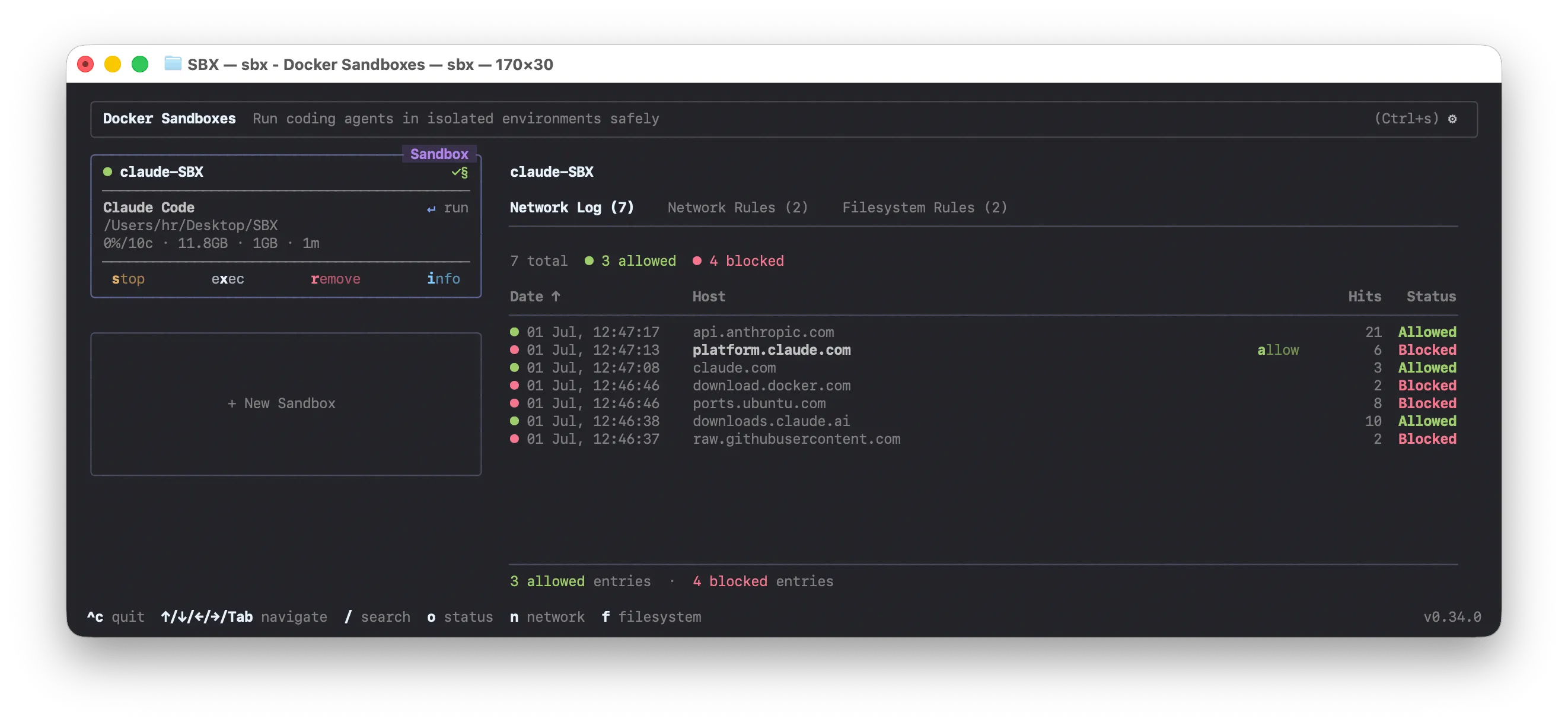
platform.claude.com, download.docker.com, and ports.ubuntu.com all blocked. The OAuth flow needs Anthropic’s endpoints and cannot reach them. Locked Down means locked down.
Allow the model provider from the host:
sbx policy allow network "*.anthropic.com"
sbx policy allow network "*.claude.com"
Retry /login. The handshake completes.
NOTE
Wildcard gotcha. example.com matches the exact host only, and *.example.com matches subdomains only, not the root. When you need both, name both. See the policy reference for the full syntax, including CIDR ranges like 10.10.14.0/24 and port suffixes like example.com:443.
Adding an MCP server to a Locked Down sandbox
Sequential-thinking is an official MCP server that installs from npm. In Claude Code:
claude mcp add sequential-thinking -- \
  npx -y @modelcontextprotocol/server-sequential-thinking
Then ask the agent to use it:
Use the sequential-thinking tool to break down how you would add
rate limiting to an Express app.
The agent cannot. And it is honest about why:
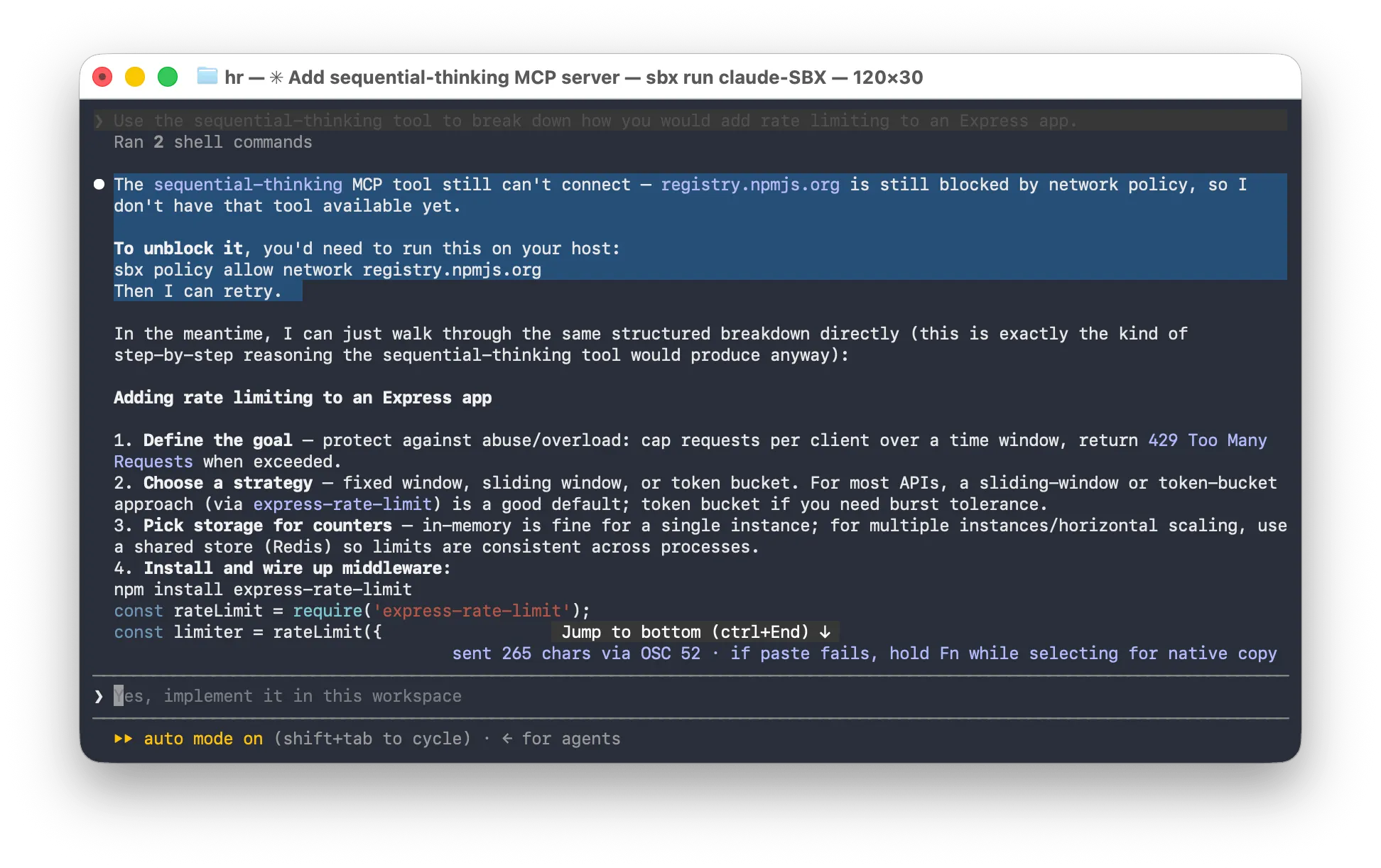
The sequential-thinking MCP tool still can’t connect,
registry.npmjs.orgis still blocked by network policy, so I don’t have that tool available yet.To unblock it, you’d need to run this on your host:
sbx policy allow network registry.npmjs.org. Then I can retry.
npx needs npm to pull the package. Locked Down never allowed npm.
Allowing a domain: CLI or TUI
CLI:
# Applies to all sandboxes by default
sbx policy allow network registry.npmjs.org
# Scope a rule to one sandbox with --sandbox
sbx policy allow network --sandbox claude-SBX registry.npmjs.org
TUI: run sbx, arrow down to registry.npmjs.org, press a. Confirm:
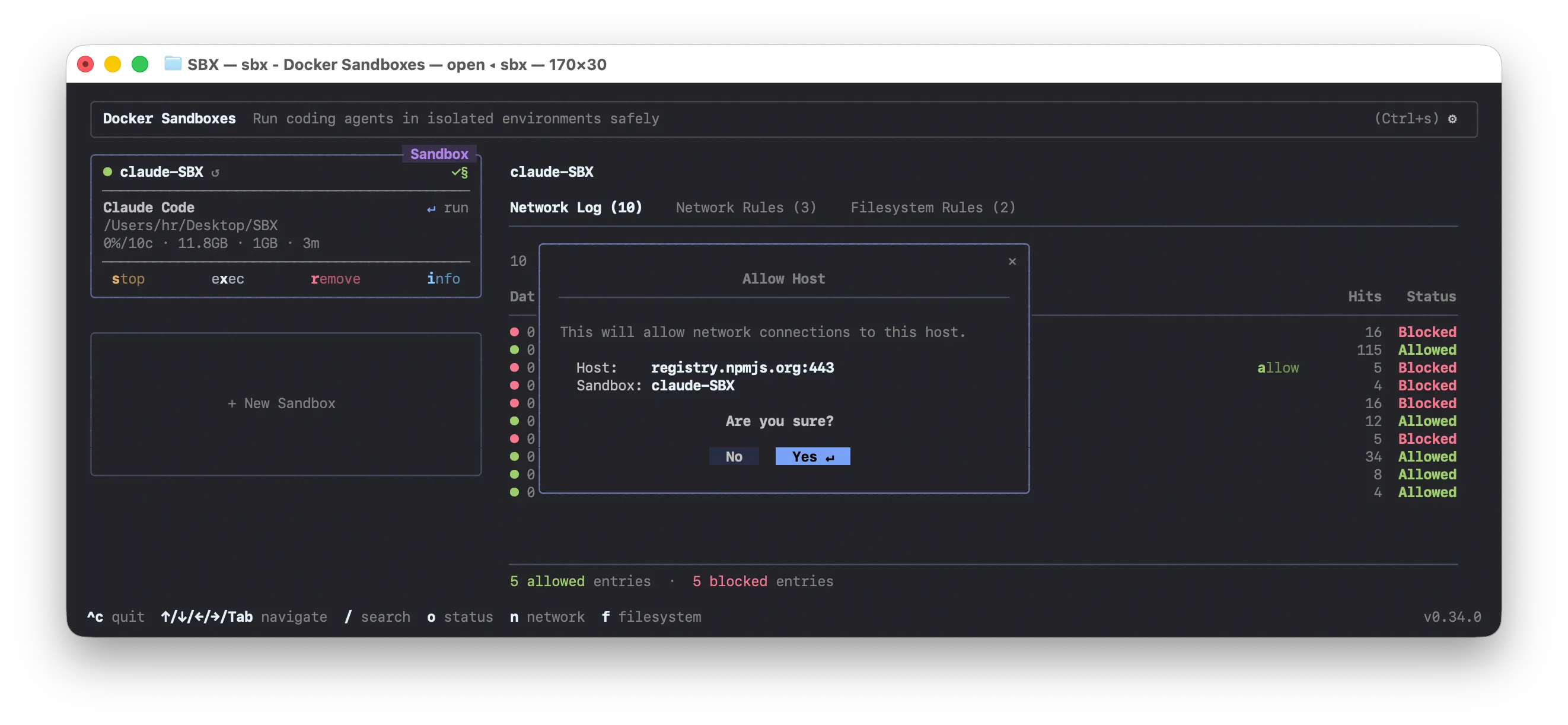
Rule takes effect immediately. No restart, no re-attach.
What the network log tells you
Retry the prompt. This time npm resolves, npx pulls the package, and the sequential-thinking tool actually runs. The agent stops apologizing and works the problem through:
Attaching to existing sandbox "claude-SBX" (workspace: /Users/hr/Desktop/SBX).
Starting claude agent in sandbox 'claude-SBX'...

Key generation: default is by IP; override keyGenerator to key by API key or
authenticated user ID for per-user limits.
Response/headers: customize the 429 handler and rely on RateLimit-* headers so
clients can see remaining quota and reset time.

Distributed store (if running multiple instances)
const RedisStore = require('rate-limit-redis');
const Redis = require('ioredis');
const redisClient = new Redis(process.env.REDIS_URL);

const limiter = rateLimit({
  windowMs: 15 * 60 * 1000,
  max: 100,
  store: new RedisStore({ sendCommand: (...args) => redisClient.call(...args) }),
});

Verify
Hammer the endpoint with a script (loop of curl, or autocannon) to confirm the
429 triggers at the right threshold and headers report correct values.

✻ Worked for 52s
That is the sandboxed agent doing real work through an MCP tool it only just earned network access to. Now look at what that cost at the network layer:
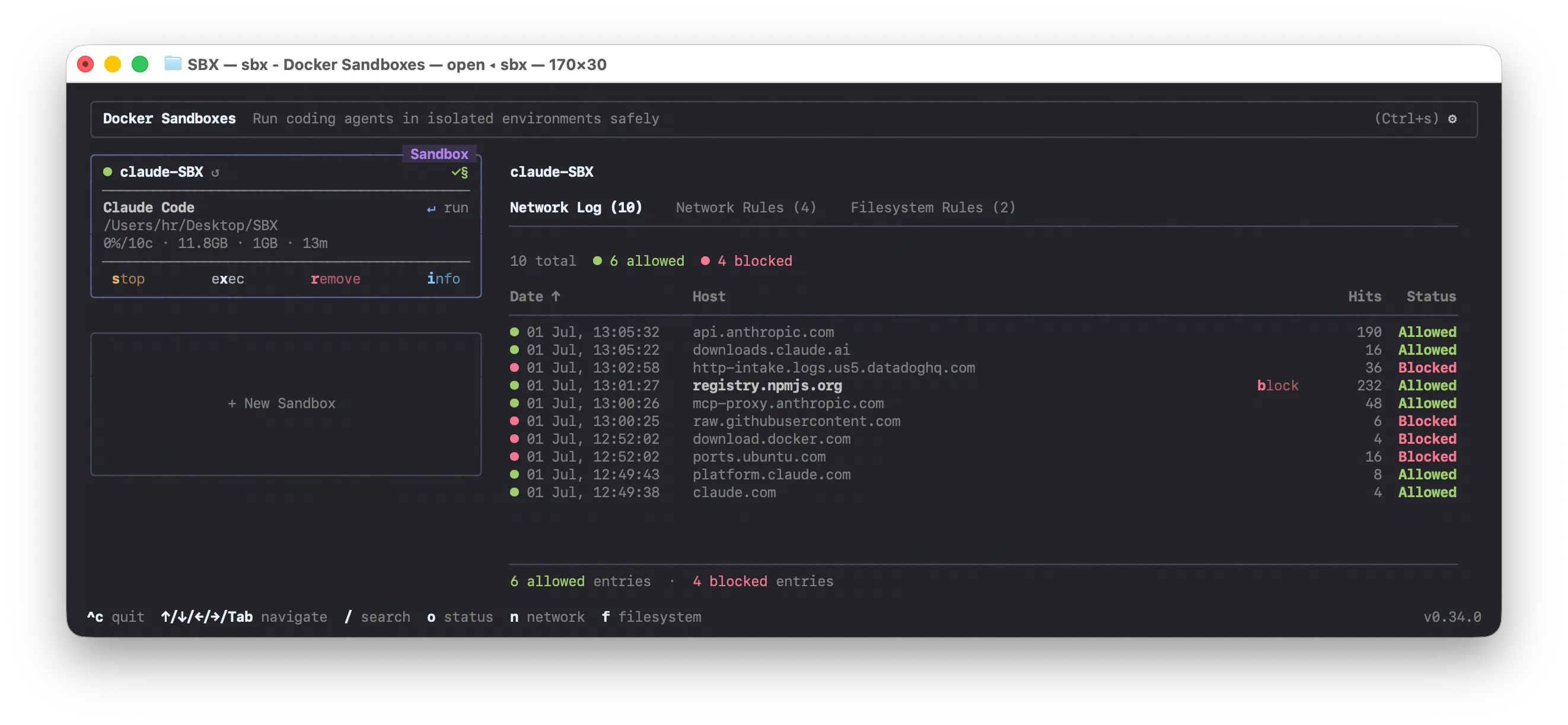
registry.npmjs.org racks up 232 allowed hits as npx pulls the package and the tool runs. Look at what is still blocked:
http-intake.logs.us5.datadoghq.com, 36 blocksraw.githubusercontent.com, 6 blocksdownload.docker.com, 4 blocksports.ubuntu.com, 16 blocks
That Datadog line is the point. Something inside the sandbox, either the agent template or one of the tools it invoked, tried to phone home with telemetry. It never got out. You did not sign off on Datadog, so Datadog does not happen. Same story for anything else a tool tries to quietly wire in. This is exactly the class of leak the Postmark BCC backdoor exploited, just going in the other direction.
sbx policy log on the host shows the same picture as text, and it names the rule that matched each request so you are not grepping packet captures:
Blocked requests:
SANDBOX      HOST                                       COUNT
claude-SBX   http-intake.logs.us5.datadoghq.com:443     17
claude-SBX   download.docker.com:443                    4
claude-SBX   ports.ubuntu.com:80                        16
claude-SBX   raw.githubusercontent.com:443              5
Allowed requests:
SANDBOX      HOST                            COUNT
claude-SBX   api.anthropic.com:443           93
claude-SBX   registry.npmjs.org:443          1
claude-SBX   downloads.claude.ai:443         12
claude-SBX   mcp-proxy.anthropic.com:443     34
claude-SBX   platform.claude.com:443         2
claude-SBX claude.com:443 4Locked Down vs Balanced: which mode to use
Locked Down made us name every domain. That was the exercise. Day to day you probably want Balanced, which default-denies but ships with an allowlist for the usual suspects: npm, PyPI, GitHub, and the major model provider APIs. You still write deny rules for what you specifically do not want, but you are not fighting basic setup. Run sbx policy ls to see exactly which rules the preset includes.
For CI or any headless environment, the interactive prompt cannot render, so set the preset up front:
# Values: allow-all, balanced, deny-all
sbx policy set-default deny-all
sbx policy allow network "api.anthropic.com,*.npmjs.org,*.pypi.org"
To change the preset interactively, run sbx policy reset. It stops the daemon and terminates every running sandbox before it re-prompts, so save your work first.
Cleaning up
sbx stop claude-SBX   # keep the sandbox, stop the VM
sbx rm claude-SBX     # delete it entirely
Images stay cached. Next sbx run boots in seconds.
Why this matters for teams
This was one laptop, but the shape scales. Your org sets a high-level policy in the Docker Admin Console: no agent can reach Datadog, no MCP server can hit random telemetry endpoints, everyone gets npm and GitHub. Individual developers layer sandbox-scoped rules on top for whatever specific project they are working on.
Organization rules take precedence, and a developer cannot override an org-level deny. Admins can optionally delegate a rule type back to local control, which lets developers add allow rules for domains the org has not explicitly denied. Every policy decision can also be emitted as structured JSONL for SIEM ingestion, which is what turns this from a laptop convenience into something a security team can actually audit.
Same rule syntax on both sides. Only the source of truth changes. That is how you let agents run in auto mode without spending the rest of the year cleaning up after them.
Share this post
Related Reading
Signing container images: Comparing Sigstore, Notary, and Docker Content Trust
A comparison of Sigstore, Notary, and Docker Content Trust for signing container images to ensure supply chain integrity.
Beyond CVE Fatigue: Why I’m Going All-In on Docker Hardened Images
Over 90% of apps rely on open source, making container images a massive attack surface. Discover how Docker Hardened Images (DHI) eliminate vulnerability noise and secure your supply chain.
Enjoyed this post? Stay updated with new articles.
Subscribe via RSSThanks for reading.